
Every month, a printer meter readings report must be submitted. The url to submit the report is:
https://scsapps.unl.edu/cpccountentry/default.aspx
The login is available in Bitwarden
To retrieve the values necessary:
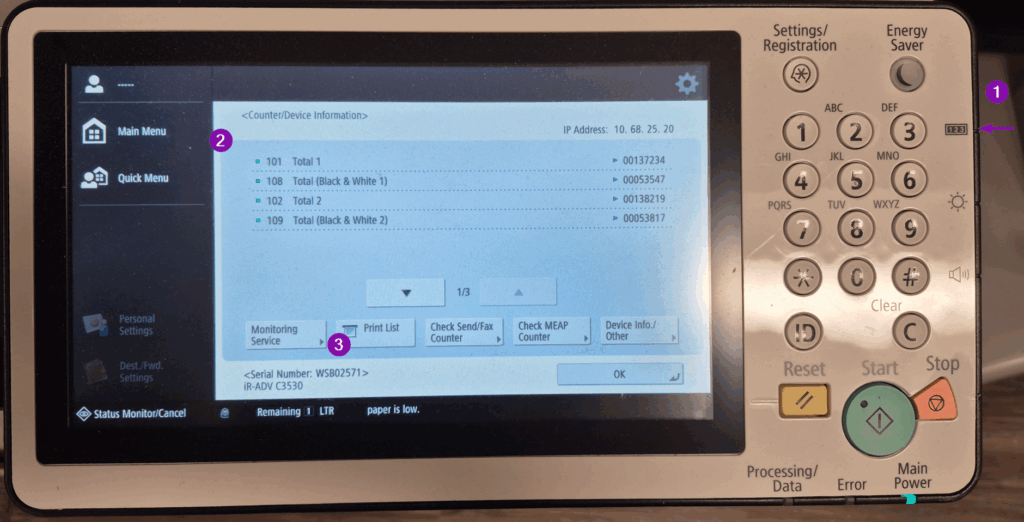
- Hit the physical button on the right of the printer control panel (purple 1 in the image below)
- Make a note of the Total 1 and Total (Black & White 1) values on the screen AND/OR
- Print the list of totals (Print List – purple 3 in image below).
- Log in to the submission page. If the inputs already have a value, then the form has already been submitted for the month, otherwise put the value from:
- Total (Black & White 1) into the Total Entry box
- Total 1 into the B/W Copy Entry box
- Click on Save.
Once the form is submitted, mark the Teamhood task labeled Printer Meter Readings as complete.
If help is needed, contact Mike Case. He asks that the printer serial number is included on correspondence. It is: WSB02571
Leave a Reply