
When a pull request (PR) is generated into the staging environment, the script validation pipeline must pass for the PR to be completed. The regular process operates in a linear but asynchronously decoupled fashion. The validation process runs the file generation process on-demand (similar to running RScript on a developer’s computer).
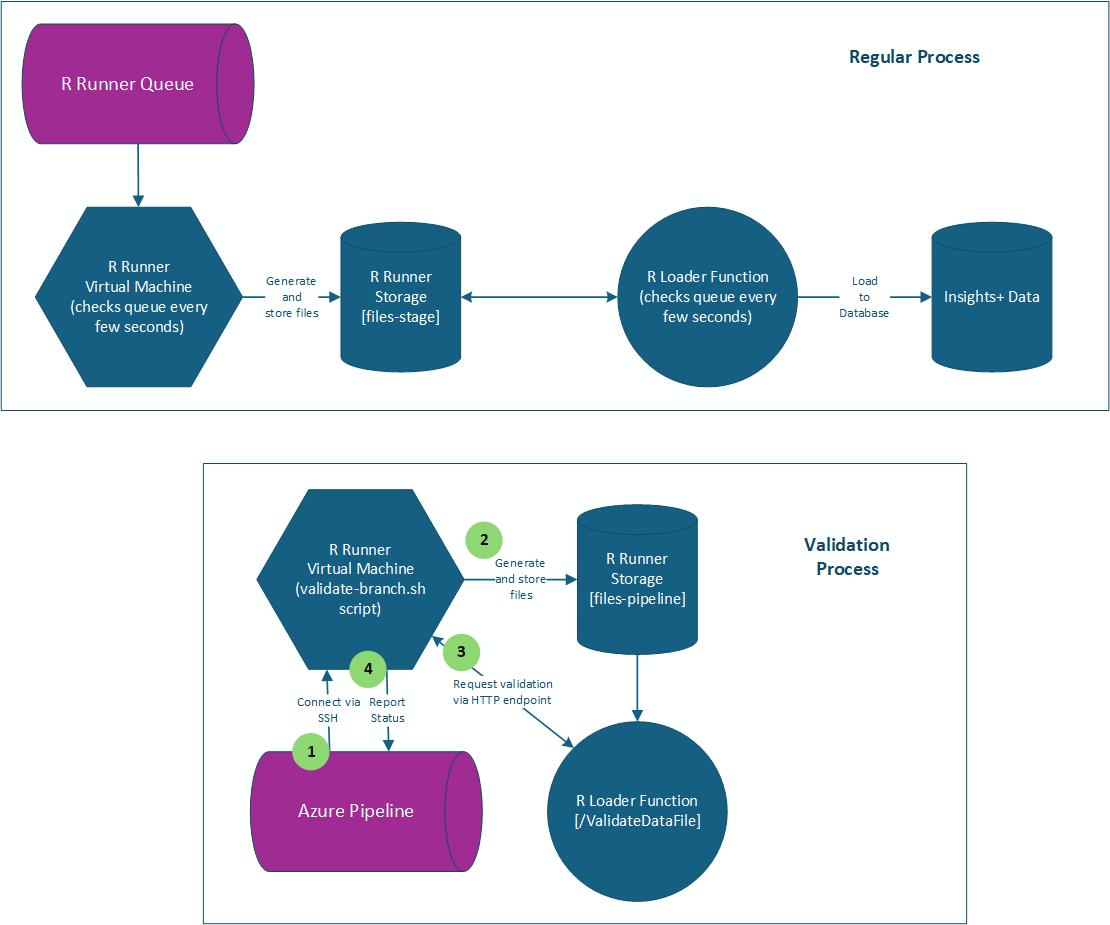
The pipeline works like this:
- The CI/CD process will use SSH to connect to the R Runner STAGING virtual machine via a set of key stored as a Service Connection in Azure Dev Ops. It connects as the rrunnerroot user.
- Upon connecting, it sets six environment variables pulled from the pipeline Variables configuration:
- STORAGE_ACCOUNT_SERVER
- where the newly generated files should be stored
- Currently: staccrrunner
- STORAGE_CONTAINER
- The storage account container used to store the generated files
- Currently: files-pipeline
- DATABASE
- Which database to use for generating the files
- Currently: sqldb-insightsdata_stage
- DATABASE_SERVER
- The database server for the DATABASE
- Currently: sql-nswers-01.privatelink.database.windows.net
- NOTE: this is a special address for use within AZURE only.
- VALIDATION_SERVER
- The server used to validate the generated files
- Currently: https://fnrdataloader-staging-d4gcdmhchthpche8.centralus-01.azurewebsites.net/api/DataFileValidation
- This is the staging instance of the R Data loader which is responsible for loading the generated data files into the database.
- VALIDATION_FUNCTION_KEY
- This is the token to allow accessing the DataFileValidation endpoint. It allows access ONLY to this endpoint.
- STORAGE_ACCOUNT_SERVER
- The pipeline now changes directory to the /r_scripts_pipeline folder on the virtual machine.
- The following GIT commands are run to prepare the environment:
- git fetch –all
- Update GIT information
- git switch -f [Name of new commit branch for PR]
- Switch to the new branch created for the PR
- git reset –hard origin/[Name of new commit branch for PR]
- Force the local code to match the files from that new branch, overwriting all local changes
- git fetch –all
- Change directory to the Pipelines folder, make the validate-branch.sh script executable, and run:
- ./validate-branch.sh [Name of new commit branch for PR] true
- Parameters:
- The first parameter on the command line should be the name of the branch to compare against the staging branch to determine changed scripts.
- The second parameter (i.e. “true”) dictates whether the files will actually generate or not. Useful for debugging, or validating older/previously existing files.
- Parameters:
- ./validate-branch.sh [Name of new commit branch for PR] true
The validate-branch.sh BASH script does the follow:
- Determine if any applicable files have changed in the scripts folder. Currently, the only files it processes are:
- explain.R
- forecast.R
- predict.R
- If any of these files have changed, it will then run the RScript command for the given outcome and stage. It uses hard-set cohort names.
- Rscript “${outcome}”/”${script_name}” -s –target_outcome “${realOutcomeName}” –cohort “${cohort}”
- The cohorts used are:
- [college_going]=’hsgraduation4years’
[college_graduation]=’ps2fallfirstfulldegreeseeking’
[college_persistence]=’ps2fallfirstfulldegreeseeking’
[employment_gap]=”
[employment_location]=’psdegreeseekingexiter’
[high_school_graduation]=’expectedhsgraduationyear’
[industry_placement]=’wfjobholder’
[time_to_employment]=’wfjobholder’
- [college_going]=’hsgraduation4years’
- For a given stage, one or more files are validated after generation is complete:
- [explain.R]=’variable_impact’
[predict.R]=’model_performance, influence_impact, individual_probability’
[forecast.R]=’forecasted_data, historical_data’
- [explain.R]=’variable_impact’
If anything fails during the process, the pipeline will fail and the PR will not be able to be completed. There is relatively extensive logging within the pipeline job to help pinpoint any errors.
Leave a Reply